When people ask what I’m up to work-wise, I vaguely mention my “rewirement.” I’ve been in the process of redesigning my “working” life into a more consciously designed life flow. In other words, I’m doing less “paid work,” and devoting more time, attention and prioritization of family, my own learning, playing my guitar and spending time in my garden.
What does this mean if you want to hire me? I’m only taking on 1-2 clients at a time. I’m done juggling many work balls, now reveling in a more spacious life. And I have three criteria for saying “yes.”
1. Work that matters in the world. Is your project trying to solve for a community? The world? Does your work echo beyond an event or project? I’m interested.
2. Great people. I’m deeply attached to who I am working with. This is a relationship, not a transaction. We are in it together long enough to supports relating to each other as people?
3. Everyone’s learning edge. I’ll refer you to wonderful folks to provide you a known service. I’m interested in the edge where we all learning. Together. Further, we are committed to sharing that learning.
If you and your work resonate with this, let’s talk.
Earlier this year some of us long time members of KM4Dev, the global community of practice knowledge management in international development, were asked to share a few thoughts on video. You can enjoy 25 of them here. I have been slowly working my way through them.
I had forgotten what I said, but when I saw my own video, I was surprised at how the things I learned through KM4Dev continue to be pillars in my post-paid-work “rewirement.” Take a peek and see what resonates!
I’ve been trying to learn more about AI (specifically Agentic AI with Pete Kaminski) and one thing I’m doing is trying to organize old publications about Liberating Structures. Here is what I’ve got so far. Do you have something I’m missing?
Disclaimer: The following was generated by ClaudeAI Sonnet 4.5. I did not review/correct/edit at this point in time. If I come back and edit, I will note it here! (Edited to add some new sources at 4:48pm on 3/10
Liberating Structures Publications Since 2010
A comprehensive list of books, articles, blog posts, and research papers on Liberating Structures
Core Books
The Surprising Power of Liberating Structures: Simple Rules to Unleash A Culture of Innovation
Authors: Lipmanowicz, H., Singhal, A., McCandless, K., Wang, H.
Published in: Wang, H. (Ed.) (2015). Communication and “the good life” (International Communication Association Theme Book Series, Vol. 2). New York: Peter Lang
This list represents the major publications and articles that were discoverable through web search and the official Liberating Structures website. The Liberating Structures community is highly active with:
Numerous practitioner blog posts and case studies
International translations and adaptations
Conference presentations and workshop materials
Community-generated content across multiple platforms
Ongoing work on a new LS book by Keith McCandless and Nancy White focusing on online/offline practice
Click here and read this gut-wrenching, inciteful and devastating piece on AI’s impact on education and beyond, by the transcendent Audrey Watters.
Here is a snippet from the end of the piece. But please, don’t read it here, click into the full piece. Slow down. Read every word. If you are not in education, just think about it in your domain. I sure think about it as a person who deeply values community. My take away from Audrey is to pay attention to what gives rise to AI, not AI itself. Read it, please.
We grieve because we love. We grieve because we care. We grieve because we know that the machines do not, and that the community we try to foster — on campus, in the classroom, in our scholarly works — is threatened with erasure. We grieve because we fear forgetting; we worry that people will forget what is beautiful and what is difficult and what is joyous and what is horrible about education. We worry that, if we do not grieve, we give up the struggle to go on, to persevere, to live.
But we do not, we should not grieve alone. We should not be made to feel alone, feel crazed by our grief, feel crazed for grieving. We can, we should grieve together, grieve in public, grieve in protest. Such is comfort – “com” + “fort,” a word that means “with” + “strength.”
Technologies are often wielded in ways meant to imply that humans are weak, messy, slow, stupid, replaceable.
We are strong, messy, awkward, flawed, irreplaceable. All of us.
Our strength comes, in part, from this vulnerability, from our humanity. Together in the flesh. Not isolated, individualized thru some algorithm. We cannot allow systems and practices and machinery to foreclose this humanity, to automate the decisions, the expressions, the explorations that we turn to and that we struggle with in education, in this imperfect but liminal space of learning.
“There is no good way to say this” but to say this: AI is the antithesis of education. It is the antithesis of the future. As such, it is a kind of epistemological death, and I recognize — thanks to capitalism and neoliberalism and imperialism and racism — we have long been surrounded by such efforts; we are grieving already. And yet, we go on.
One final note that I think I’d be remiss not to state, even though there is no good way, or rather no polite way to say this:
Some men (and I do mean mostly men) would rather spend trillions of dollars on an idea that is financially, technologically, morally, and environmentally unsustainable, they’d rather destroy democracy and destroy education and destroy the planet than just get therapy.
I’m working on a pro-bono project and came across a request for an online meeting resource. After scrolling through a mind-numbing number of “ok” resources, and struggling to re-find old favorites, I thought I’d share some patterns instead of a recipe.
This is something I’ve been playing with for the new Liberating Structures (LS) book Keith McCandless and I are writing. It comes from a draft chapter on how to get started with LS. It describes six steps or phases of implementation and builds on common meeting and facilitation practice, and expresses the “how” by using LSs. You can replace your favorite interaction processes, all the while y’all know I dearly love Liberating Structures!
Each section has a section for purpose, process/Liberating Structures and tech/artifacts. This just gives you a taste, some hints and resources, but not the full meal. If there is something specific you want to know more about or have questions, please leave comments!
TDLR: Connect people immediately through small group breakouts for meaningful conversation. Reduce presentations. Alternate pacing, mix up people in breakouts and collectively identify what is important to capture. Enable technologies that give power to people to contribute visually, verbally, in text and to interact with each other rather than centralized control.
One: Design, Document & Prepare
Purpose
Define the group’s purpose to inform agenda design.
Hints:
Include participants’ needs and perspectives in planning (vs. just the sponsors). Include some of them in your design team!
Consider crafting a statement to frame the purpose like this: The purpose of this meeting is to (DO WHAT) so that (WHO) can (DO WHAT). We know we are making progress when (DESCRIBE). To dig deeper into purpose, try 9 Whys.
Attend to relational practices in the context of your group. For example, in times of change, grief or trauma, make space at the start for people to be seen and heard in small groups of 2-4. Take pauses for people to process not just thoughts, but feelings.
Remember: content can be delivered asynchronously; relationship and connecting benefit from synchrony.
Process/Liberating Structures
Design your agenda. Prioritize people and connection before content. You can use LSs for planning too. Purpose to Practice helps include all the aspects of a meeting plan. Design Storyboard helps consider process options and patterns. Always be ready to shift if something shows up in the room suggesting change and adaptation.
Hints:
Ensure balance between purposeful interaction and content. Reduce presentations to a minimum. Alternate fast and slow interactions. Alternate frequently between small/large group options where people have a smaller space to share ideas and a larger space to make sense across ideas. Build in time for quiet reflection. Offer space for “no video” time or options for whom video is draining.
Craft invitations for each step, activity and/or LS. Iterate till you have the clearest, simplest invitation that both guides and leaves space for emergence (we call this precise ambiguity!)
Ensure the participant agenda you send in advance is focused on purpose, not minute by minute process details that can pre-program people to decide what to skip and what to attend to.
Use the Matchmaker to select and sequence (“string”) your LSs/processes that meet the needs of people doing the work. Here are some examples of some of the easiest LSs to use. More are also noted in subsequent steps.
Spiral Journal (see instructions as an example at the bottom of the post) to make sense at a personal level
Tech and Artifacts
Identify and prepare the technology and visual supports needed for your meeting.
Hints:
Prepare a run sheet (a.k.a. “Run of show”) that adds on the details including prompts ready to paste into chat, visual materials (slides, shared whiteboard or document, polls, etc.), and breakout plans.
Identify roles (who leads what, who tech hosts, cybrarian tasks: who supports capturing artifacts, etc.)
Ensure tech is configured for maximum P2P interaction (group chat, direct messaging, hands on creation of knowledge artifacts.)
Support verbal instructions with prepared visual materials.
Carefully consider value of recordings from a value creation (or not) and privacy standpoints
Two: Get the Meeting Started and Settled
Purpose
Support connection and a graceful entrance into technology and launch with interactions that set the tone for the meeting. Attend to the diverse needs of people with a welcoming, inclusive and aesthetic environment.
Process/Liberating Structures
Immediately use LSs that focus on small group breakouts so people can connect and be seen/heard/respected through meaningful, relevant conversational prompts. This is very different from “go around the room and introduce yourself” which can be numbing after a while. Avoid random ice breakers and focus on your purpose. If people are new to tech, make the breakout process as simple as possible to serve as “practice.” You may be pleasantly surprised at how effective starting with meaningful conversations in breakouts changes the tenor of the whole meeting. It says “what you think, say and feel matters!”
Hints:
Open the room 5 minutes early and encourage informal greetings, sharing something in chat.
Focus on people’s faces, not a slide or agenda.
Tech and Artifacts
Hosting team arrives early for a tech check to ensure all settings/plans/roles are clear and in place.
If recording, start after the informal 5 minutes. Pause recording during breakouts and stop recording at end of meeting.
Provide tech support (“how to” slide for features you are using, breakout for individual tech support, share hints in chat.)
Three: Dig Into the Work
Purpose
Support the use of LSs (or other relevant processes) to achieve the group’s purpose. Delete anything that does not serve the purpose and the participants, where possible. This includes generic welcome talks, over-general presentations and a detailed description of the agenda. Hit the points that move the purpose forward.
Process/Liberating Structures
Follow the minimum specifications of each LS, at least until you are familiar with them. Then improvise. Notice where people do or do not understand your prompts and invitations; take a breath and try again. If people are getting confused, slow down. If things are getting repetitive and “speachy,” speed up. If a moment arises when everyone wants to talk, send them into breakouts so everyone gets a chance to talk (not just those comfortable speaking or dominators) and ask the groups to share back ONLY what they think everyone should hear. Capture key points.
Tech and Artifacts
Attend to verbal and visual support. Sometimes we don’t listen as well online so reinforcement with visual instructions is helpful.
Support shared capture of key content – try and get participants to identify what is important. They know best. Can use chat, shared documents, whiteboard, polls, etc. This is different from having, for example, a staff member “take notes.”
Four: Debrief and Identify Next Steps
Purpose
Develop practices to identify next steps and preparation for moving forward. Debrief for future process and improvement. Next steps can be at any or all levels—individual to whole group.
Spiral Journal (see instructions as an example at the bottom of the post) to make sense at a personal level
Tech and Artifacts
Continue to provide participants a mechanism to capture content that is identified as important to participants (vs “capture everything”)
Five: Close
Purpose
Bring the meeting to a close so everyone has clarity on next steps. Provide a human transition in a tech-driven, abrupt environment. F2F we can chat after a meeting has ended, wave, and say goodbye. With intention, we can do this online.
Process/Liberating Structures
Just Three Words in chat (Reflect over our time together. Use three words, just three words, to describe it. Put it in chat.)
Sharing appreciation (The thing I heard from NAME that is staying with me is DESCRIBE.)
Turn on cameras and waving goodbye
Tech and Artifacts
Save all digital artifacts that are needed going forward. Identify follow up cybrarian tasks.
Six: Organize the Artifacts
Purpose
Keep data organized and available for “lifting off from where we left off.” For one time meetings, this can be as simple as bringing together all the artifacts and sending out links or pdfs. For ongoing work, call out conclusions, next steps and actions and send them as soon as possible to participants.
Process/Liberating Structures
This work is more administrative than something connected with group process. However, having the participant representatives involved in designing the meeting suggests we can also do this at the output stage. What do THEY find important? What meaning do they make of the data?
Tech and Artifacts
Have a plan for where artifacts are stored, what format, how public/private they should be, what and how things are shared or distributed and by when.
For meetings with follow ups, ensure what has been captured from where the group left off and a sense of how they will be used in the next meeting for “lift off.”
Since Liberating Structures (LS) were first launched into the world, they generated creative energy in practitioners around the world to create new ones. Some people identified gaps that they found in the repertoire. People generated alternatives to existing structures. Adjacent communities saw opportunities to cross pollinate their approaches with LS. We experienced a flowering of new LS.
Most efforts were informal. New structures were passed around between practitioners but rarely documented and intentionally tested. There was some sense that a structure had to be “approved” in order to be “included.” Yet within the distributed LS network, there was no formal mechanism to do this. So collections emerged (e.g. on the LS website) with structures ranging from well defined and tested, to those only a handful of practitioners knew and practiced.
A conundrum? Not really. To be a structure it must:
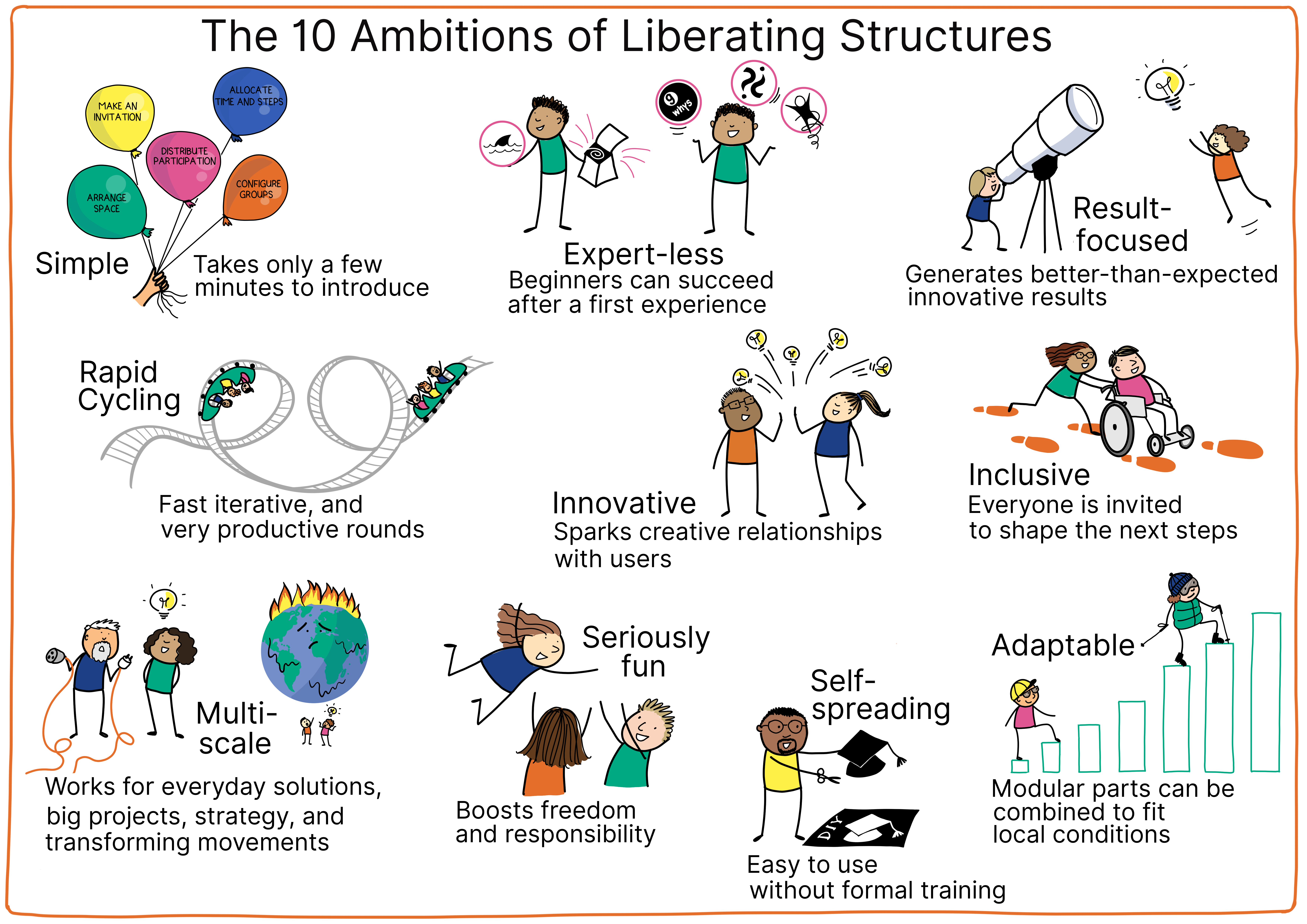
address the ambitions of LS (see image below) to the highest degree possible
be recorded into the LS template (shared below and which has been updated this year as Keith McCandless and I write a new LS book – stand by!), and,
be practiced, integrated and improved and finally SPREAD. By spread, we mean that the developers of new LSs actively share their offerings through immersions and use in their work.
Drawing credit: Thea Schukken (artist) and Barry Overeem (The Liberators)
There is no formal way to “get new LSs into the repertoire.” Currently there are some Google docs and a Trello board capturing some of them, but it is neither a complete list, nor are all the LSs fully formed. Some folks have forged ahead and made design card decks and included the new LSs they found useful. Holisticon and The Liberators got things started with beautiful cards. And more!
In the new LS book, we are including 10 of these many new LSs and we have made sure to note any online adaptations. (We did that for the original 33 as well!). There was no attempt to be comprehensive but rather to show examples of the great LS flowering. And there was no intent to exclude any others. There is an abundance of adaptations and inventions embedded in our network of LS practice. The best thing we can do is get creative. LS are always adapted and are used adaptively.
Adapting
Before we create new LSs, consider adapting existing ones. That alone may fill the gap. Here are some ways to adapt that we are including in the new LS book.
I Have a New LS and I Want To Share It
Great! Here are our suggestions!
Write up your LS using the template below. Check out an example of the template in use at the bottom of this post. Include any online adaptations that are needed. Tip: Work with a partner for more fun and ease.
Share your draft with both experienced and novice users. Experienced users may help you refine and new users are the acid test. If they can reliably reproduce the benefits of the structure, you are doing a good job. Tip: when you can simplify, DO IT! (Do as I say, not as I sometimes fail and do!)
Refine your draft again and use it/have others use it as much as you can. Ask for their feedback and refine again. We have been constantly surprised at how much iteration improves the design of a LS. As they say, “lather, rinse and repeat!”
Develop an icon and collateral materials if you can. The visual aspects of the LS repertoire are part of what makes LS special.
Spread the word. Share your structure with user group gatherings and with your friends and colleagues.
LS Template
Instructions are in [brackets]. You can find a copy of the template here which you can copy and fill in. There is an example following the template. Have fun!
[Icon] [TITLE OF LS]
[Tagline: express its essence. Simple, directive, in title case] e.g. Engage Everyone Simultaneously in Generating Questions, Ideas, and Suggestions]
[Duration] E.g. 15 min
[Relevant Quote that enlivens the structure with attribution] Tell me and I will forget. E.g. Teach me and I may remember. Involve me and I learn. Benjamin Franklin
WHAT IT MAKES POSSIBLE
[A brief explanation of what you can accomplish using the structure. When a LS brings one of the LS Principles to life, make note of it here. Begins with a description of the LS in 1-2 sentences. Goes on to describe the benefits of the LS in third person (ok to use second person, addressing host and group).]
TAKING IT ONLINE
[This new sectionlays out roles and online adjustments to the five microstructural elements. If relevant, it calls out shifts in the interaction dynamic experienced by the participants. Third person (ok to use second person, addressing host and group, e.g., “Use it when…”).]
FIVE STRUCTURAL ELEMENTS—MIN SPECS
[What to do and how to do it, step by step. Where there is a difference between F2F and Online, you will see both options listed. Where relevant, the tech tasks are included.]
1. Structuring Invitation
[First-person statement for the host to read out to the group that flows from the description and what is made possible. This is then used in the Steps below, reducing duplication.]
2. How Space Is Arranged and Materials Needed
[Identify for each of the bullets below. Note online differences. All noun phrases/sentence fragments. Online accommodations in brackets and highlighted in light gray.]
Room Setup: [Physical/virtual space requirements, furniture setup] E.g.: Space for participants to work face-to-face in pairs and foursomes [breakout rooms]
Tools & Supplies: [Tools for recording/sharing]
Display: [What to display, what display materials are needed. Identify visual materials to share the steps and/or prompts because online our attention may wane.]
3. How Participation Is Distributed
[All noun phrases/fragments]
Roles: [which roles need to be filled, including differences online with tech hosts)]
Minimum: [minimum number of participants, if applicable]
Inclusion: [Default: Everyone is invited and has equal opportunity to contribute. Adjust as needed.]
4. How Groups Are Configured
[All noun phrases/fragments]
Configuration: [alone, in pairs, whole group, etc.]
Group Structure: [Specific group sizes, specifications for membership]
Formation: [How groups are formed]
5. Sequence of Steps and Time Allocation
Name of Step 1 (X minutes). [Describe what happens in third person.
Format participant-focused language (directions, questions) as bullet points. Online instructions in square brackets and light gray shading.
The name of the step is in title case. Capitalize most words after hyphens, e.g. “Plan Follow-Up.”
Format name of step as noun or directive, e.g. “List Items” (not “Listing Items”).
Do not number steps.
Capitalize steps when referring to them in other sections.
The first step is always Intro (1 min). Share the structuring invitation. Display supporting materials where everyone can see them.]
WHY? PURPOSES
[Primary reasons for using this Liberating Structure. Directives in second person. [E.g.: Engage every individual in searching for responses to a challenge]
TIPS AND TRAPS
[Useful advice for ensuring the best possible outcomes including attention to online.]
Tips:
[Statements in third person. Complete sentences ending with a period].
Traps:
[Identify what the trap is. [Statements in third person. Complete sentences ending with a period.]
RIFFS AND VARIATIONS
[Alternatives or embellishments for you to try and ideas for designing others. Options for complementary LS and frequently used strings. ]
[Statements in third person. Complete sentences ending with a period.]
PRACTICAL APPLICATIONS
[A few ideas and real world use cases to inspire you to find opportunities that exist in your context.]
[Complete sentences with a period.]
[Standalone bullet points. Have to be differentiated from purposes. (If an example doesn’t fit here, move it to purposes.)]
ATTRIBUTION
[Our most immediatesources of inspiration or invention. There are many additional rhizomatic connections to the deep and rich traditions in facilitation, organizing, complexity theory and organizational development.]
Name(s) or one key source
COLLATERAL MATERIALS
[Useful presentation materials and templates plus illustrations of Liberating Structures in action. They can be projected or used as handouts F2F and used as slides or whiteboard templates online. For LS with multiple dimensions and phases, we recommend participants draw the image by hand.]
[Images or instructions that are used in running the structure with captions.]
[Templates to capture ideas and actions generated by participants (with space for sticky notes.)]
Example of a Newly Formatted LS
Spiral Journal
Calmly Prepare and Sharpen Observations for the Work Ahead
If there were a little more silence if we all kept quiet… maybe we could understand something. Federico Fellini
18-20 min
WHAT IT MAKES POSSIBLE
In Spiral Journal, participants draw a spiral and respond to four open-ended prompts to focus their thoughts, and enact the LS principle Practice Self Discovery Within a Group. This structure helps us reflect calmly on challenges or opportunities, unleashing our most creative ideas. When shared, these responses reveal patterns and potential new directions for our work. This approach also creates a comfortable space for quieter people to contribute to planning next steps.
TAKING IT ONLINE
Spiral Journal works well as a way to calmly start an online meeting. It helps people transition from their previous activities, supports both individual and group reflection, and reintegrates physical activity into online interaction.
FIVE STRUCTURAL ELEMENTS—MIN SPECS
1. Structuring Invitation
Before we jump into talking about our topic, let’s take a few minutes to collect our thoughts. We are going to do a quiet activity to prepare for the work ahead. By digging deeper into our imaginations, we will uncover a range of ideas and options.
2. How Space Is Arranged and Materials Needed
Room Setup: Space for participants to form pairs and trios [breakouts of 2-3]
Supplies: Paper and a pen or pencil for each participant
Display: Supporting materials to reinforce invitation, prompts, and steps
3. How Participation Is Distributed
Roles: Host, participants [tech host]
Inclusion: Everyone is invited and has an equal opportunity to contribute.
4. How Groups Are Configured
Configuration: Alone, pairs or trios, whole group
No minimum group size
Formation: Participants choose their own groups. [Randomly assign participants to breakout groups.]
5. Sequence of Steps and Time Allocation
Intro (1 min). Share the structuring invitation. Hand out paper. [Display instructions where everyone can see them and ask everyone to find a piece of paper.]
Spiral Setup (1-2 min). Instruct participants to take a sheet of paper and demonstrate the process:
Fold it in half twice to create four equal quadrants.
Draw a small dot at the center of the page where the folds intersect.
Starting from the center dot, slowly draw a spiral outwards. Keep the lines very close together.
Generate Ideas (8 min). Assign a prompt for each quadrant. For example:
Upper left: My absurd, impractical ideas are…
Upper right: My bold yet actionable ideas are…
Lower left: My common sense ideas are…
Lower right: My low- or no-cost ideas that can be acted on immediately are…
Participants take 2 minutes per quadrant to write their responses.
Review and Select Ideas (2 min). Invite participants to read through their responses and circle one or two ideas that stand out or surprise them.
Group Sharing: Pair or Trio Discussion (3 min). Participants form pairs or trios [breakouts of 2 or 3] and share the ideas they circled with each other, sharing why those ideas stood out for them.
Group Sharing: Collective Insights (3 min). Everyone returns to plenary. Invite a few participants to share any key insights, observations, or common themes that everyone should hear [in Chatterfall]. Record these insights where everyone can see them.
WHY? PURPOSES
A slow and deliberate activity can improve the depth and quality of responses.
A wider range of options can arise from inviting different types of ideas.
Freewriting without judgment can reveal unexpected associations.
With time to reflect, each participant can access a huge store of memories and assemble them in novel combinations.
TIPS AND TRAPS
Tips:
All spirals are perfect, whether neat or wobbly. The action of drawing is the important part.
Explain afterwards that there is no other purpose to the spiral other than to focus our attention and be present while drawing.
Encourage everyone to write down all their ideas without filtering or critiquing them. Then they can choose what they want to share (and nothing more).
Traps:
Interruptions can break people’s concentration, which is essential for Spiral Journaling. Act like a librarian! Do everything you can to avoid interruptions while participants are drawing and writing.
RIFFS AND VARIATIONS
You can adapt the four prompts for different situations. For example, a group making a transition or working through a loss could respond to these prompts:
Yes, it is true that…
It is hard because…
I will always remember, I will never forget…
Now, it may be possible for me to…
Use Spiral Journal at the beginning of a meeting or workshop and link the sequence of prompts directly to the purpose of the session. See examples linked to clarifying context and expanding options shown in Collateral Materials.
To close in plenary, invite participants to consider how the response adds to a previous activity or informs the next. Ask, “Based on these responses, what seems possible now?”
Play gentle background music while people draw their spirals.
PRACTICAL APPLICATIONS
Use Spiral Journaling to start a gathering where there will be diverse views and opinions. The spiral centers attention, then allows people to see where there are common or divergent perceptions of a challenge or situation.
Help a group slow down and generate fresh ideas or reflect more deeply on a challenge.
ATTRIBUTION
Developed by Fisher Qua and Anna Jackson with inspiration from Lynda Barry (cartoonist)
COLLATERAL MATERIAL
Instructions to demonstrate preparing a page for Spiral Journaling.
A sample page layout for Spiral Journal. The four open sentences are designed to expand the depth and breadth of options to be considered.
We use cookies on our website to give you the most relevant experience by remembering your preferences and repeat visits. By clicking “Accept”, you consent to the use of ALL the cookies.
This website uses cookies to improve your experience while you navigate through the website. Out of these, the cookies that are categorized as necessary are stored on your browser as they are essential for the working of basic functionalities of the website. We also use third-party cookies that help us analyze and understand how you use this website. These cookies will be stored in your browser only with your consent. You also have the option to opt-out of these cookies. But opting out of some of these cookies may affect your browsing experience.
Necessary cookies are absolutely essential for the website to function properly. These cookies ensure basic functionalities and security features of the website, anonymously.
Cookie
Duration
Description
cookielawinfo-checkbox-analytics
11 months
This cookie is set by GDPR Cookie Consent plugin. The cookie is used to store the user consent for the cookies in the category "Analytics".
cookielawinfo-checkbox-functional
11 months
The cookie is set by GDPR cookie consent to record the user consent for the cookies in the category "Functional".
cookielawinfo-checkbox-necessary
11 months
This cookie is set by GDPR Cookie Consent plugin. The cookies is used to store the user consent for the cookies in the category "Necessary".
cookielawinfo-checkbox-others
11 months
This cookie is set by GDPR Cookie Consent plugin. The cookie is used to store the user consent for the cookies in the category "Other.
cookielawinfo-checkbox-performance
11 months
This cookie is set by GDPR Cookie Consent plugin. The cookie is used to store the user consent for the cookies in the category "Performance".
viewed_cookie_policy
11 months
The cookie is set by the GDPR Cookie Consent plugin and is used to store whether or not user has consented to the use of cookies. It does not store any personal data.
Functional cookies help to perform certain functionalities like sharing the content of the website on social media platforms, collect feedbacks, and other third-party features.
Performance cookies are used to understand and analyze the key performance indexes of the website which helps in delivering a better user experience for the visitors.
Analytical cookies are used to understand how visitors interact with the website. These cookies help provide information on metrics the number of visitors, bounce rate, traffic source, etc.
Advertisement cookies are used to provide visitors with relevant ads and marketing campaigns. These cookies track visitors across websites and collect information to provide customized ads.